
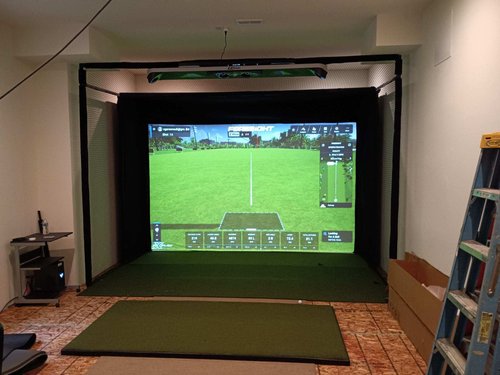
Custom Built vs. Enclosure…Which Setup is Right for You?

Custom Built vs. Enclosure…Which Setup is Right for You?

When planning a home golf simulator, one of the biggest decisions you’ll face is whether to go with a fully custom built-in golf simulator or a modular enclosure setup. Both have their place, and the right choice depends on your goals, budget, and space. In this guide, we’ll compare the advantages and disadvantages of each, especially from the perspective of homeowners looking for golf simulator installation services.

What Is a Custom Built-In Golf Simulator Setup?

A custom built-in golf simulator is seamlessly integrated into the architecture of your space. This might involve building a recessed impact screen, ceiling-mounted projectors, built-in lighting, and soundproofed walls—all designed to deliver a premium golf experience that blends into your home.

🔹Pros of Custom Built-In Setups:

1. Premium Aesthetics
Built-ins often look like part of your home or entertainment room, elevating both appearance and resale value. Everything—from wall finishes to lighting—is tailored to match your home decor.

2. Maximum Space Optimization
Since custom setups are designed to your room’s exact dimensions, no space is wasted. That means better swing clearance, optimized launch monitor positioning, and superior overall playability.

3. Seamless Cable Management and Acoustics
Wires, speakers, and projectors can be hidden behind walls or inside ceilings. Acoustic panels and lighting can be integrated invisibly for a cleaner, more immersive setup.

4. Fully Personalized Design
From hitting mats to wall colors and even custom cabinetry, a built-in simulator offers complete creative control.

🔹Cons of Custom Built-In Setups:

1. Higher Cost
Custom designs often require carpenters, electricians, and other tradespeople. That adds up quickly.

2. Longer Installation Time
Compared to enclosure kits, a custom build can take several weeks from start to finish.

3. Less Flexibility
Once it’s built, it’s permanent. Relocating or modifying your simulator can be costly and time-consuming.


What Is a Golf Simulator Enclosure Setup?

An enclosure setup typically consists of a pre-fabricated frame, impact screen, side walls, and sometimes blackout curtains. These are modular and freestanding, making them ideal for garages, basements, or multi-purpose rooms.

🔹Pros of Enclosure Setups:

1. Quick and Easy Installation
Most enclosures can be assembled in a day or less by a professional golf simulator installer—or even as a DIY project.

2. Lower Cost
Enclosures are generally more affordable than custom setups. You still get a great playing experience at a fraction of the cost.

3. Portability
Need to move? Modular enclosures can often be disassembled and relocated.

4. Variety of Sizes
Many companies offer different enclosure sizes to fit garages, bonus rooms, or spare bedrooms.

🔹Cons of Enclosure Setups:

1. Less Aesthetic Appeal
Enclosures are more functional than beautiful. They may clash with your interior design and look bulky in a finished room.

2. Visible Cables and Hardware
While some enclosures offer cable management options, they rarely match the polished look of a built-in setup.

3. Limited Customization
You’re working within the constraints of a kit. Custom tweaks may not be feasible.


Which Should You Choose?

If you're seeking a premium, permanent solution that seamlessly fits into your home—and you're ready to invest in top-tier golf simulator installation services—a custom built-in setup is likely your best bet. It's ideal for luxury game rooms, dedicated golf spaces, or high-end entertainment areas.

If you're looking for something more budget-friendly, flexible, and easy to install, an enclosure setup is a fantastic option. It’s particularly great for renters, multi-use spaces, or those who plan to relocate in the future.

🔹How Golf2U Can Help

At Golf2U, we specialize in both custom built-in and enclosure-based golf simulator installations across Florida and the Greater Boston area. Whether you’re dreaming of a sleek, integrated look or a flexible modular setup, our expert team can help you design and install the perfect solution.

Get in touch with Golf2U today to explore your golf simulator options and get a quote from the pros who make home golf dreams a reality.


  • Blog post

    Give your customers a summary of your blog post

    12 Blog post

    Give your customers a summary of your blog post

  • Blog post

    Give your customers a summary of your blog post

    12 Blog post

    Give your customers a summary of your blog post

  • Blog post

    Give your customers a summary of your blog post

    12 Blog post

    Give your customers a summary of your blog post

  • Blog post

    Give your customers a summary of your blog post

    12 Blog post

    Give your customers a summary of your blog post

1 of 4
Back to blog

Golf simulator FAQ's

How can i convince my wife to let me have a golf simulator?

1. Tell her it's a movie room

2. Get your kids into golf

3. Tell her it'll mean less golf trips and that you'll be home more

How much does a golf simulator cost?

We're not trying to be cagey with this answer but.... IT DEPENDS! There are about 10 different components that make up the golf simulator which will dictate your overall cost. The biggest two things that will determine the cost of your simulator are 1. Which launch monitor you choose and 2. Whether you go with a custom built-in screen or an enclosure.

How much space do I need for a simulator? Will it fit in my house?

To set up a golf simulator, you need to consider the height, width, and depth of the room.

  • Ceiling Height: Ideally, you need at least 9 to 10 feet of ceiling height to swing a golf club comfortably, especially for taller players or those with a high swing. A height of 10 feet is generally recommended for maximum flexibility.

  • Room Width: For the width, 12 feet is a common recommendation, allowing enough space for both right- and left-handed golfers to swing comfortably without hitting the walls.

  • Room Depth: The room should be at least 15 feet deep, which allows space for the golfer to stand, the screen, and the projector or monitor setup. This distance also provides enough room for the ball to travel and the simulator to capture accurate data.

Have more questions or have a specific situation you need to ask about? Contact our team today. Our phone number is 813-463-8279
and our email is info@golf-2-u.com

Will my simulator have other uses? Can I use it as a theatre room or for other sports?

Absolutely! Your entertainment space is about more than just golf.

Fortunately, we've use industry leading screens to withstand impacts from just about anything you can throw (or kick) at it. Further, your projector setup can serve double duty as a home theatre system, a larger than life workout app display, or immersive video game experience unlike anything you’ve ever seen.

Have more questions or have a specific situation you need to ask about? Contact our team today. Our phone number is 813-463-8279
and our email is info@golf-2-u.com

What courses can I play on my golf simulator?

LOTS!

Most golf simulators offer a wide range of virtual courses, including world-famous PGA Tour courses, classic championship layouts, and even fictional or user-designed courses. The specific selection depends on the simulator software you’re using.

Some of the most popular real-world courses you can play include:

  • Pebble Beach (available on TrackMan and TGC 2019)
  • St. Andrews Links (on TrackMan, E6 CONNECT, TGC 2019)
  • Whistling Straits (on TGC 2019)
  • Bethpage Black (on E6 CONNECT and TGC 2019)
  • TPC Sawgrass (on E6 CONNECT and TGC 2019)
  • Royal St. George’s (on TGC 2019)
  • Pinehurst No. 2 (on TrackMan, E6 CONNECT)
  • Spyglass Hill (on TrackMan)

Some software, like TGC 2019, offers over 170,000 courses, including user-created ones, while others, such as E6 CONNECT, focus on high-quality recreations of around 90 courses. TrackMan and GSPro also offer excellent course selections and realistic gameplay​. You'll want to discuss computer requirements with our team to make sure you have everything you need.

Our phone number is 813-463-8279 and our email is golf2ubiz@gmail.com

Have more questions or have a specific situation you need to ask about? Contact our team today. Our phone number is 813-463-8279
and our email is info@golf-2-u.com

How much will my golf simulator cost and how fast can you build it?

Because Golf2U’s solutions are tailor made to your needs, it can be impossible to predict how long your build will take from start to finish. We'll do our best to set clear expectations about the complexity and timing of your build once we've gathered all your requirements. As a general rule, once we've agreed on a design, you can expect 3-4 weeks to make/gather your materials and execute your build.

Have more questions or have a specific situation you need to ask about? Contact our team today. Our phone number is 813-463-8279
and our email is info@golf-2-u.com

Can a golf simulator improve my game?

Yes! A golf simulator can significantly improve your golf game. Here's how:

1. Practice Year-Round

A golf simulator allows you to practice your swing regardless of weather or season. With consistent, year-round practice, you can improve your muscle memory, swing mechanics, and overall consistency.

2. Data-Driven FeedbackSimulators provide real-time data on every shot, including ball speed, club speed, launch angle, spin rate, and shot dispersion. Analyzing these metrics helps you understand and adjust specific aspects of your swing, like your angle of attack, clubface alignment, or swing path. For example, systems like TrackMan and SkyTrak offer in-depth insights into your ball flight and performance​.

3. Course Management

Playing virtual rounds on famous courses helps improve your course management skills. You learn how to approach different types of shots, manage hazards, and make better decisions on club selection. Many simulators allow you to practice on replicas of real-world courses, giving you a better understanding of how to navigate challenging layouts​(Golfstead).

4. Targeted Practice

Most golf simulators offer practice modes that allow you to focus on specific aspects of your game, such as driving, iron play, or putting. You can practice in a controlled environment, repeat shots from the same position, and work on weak areas like bunker play or approach shots.

5. Mental Focus and Strategy

Regular simulator practice builds mental toughness by mimicking pressure situations, such as hitting a shot to a small target or making a crucial putt. This can translate into more focus and confidence during real rounds of golf.

By offering detailed feedback, unlimited practice opportunities, and simulations of real-world courses, a golf simulator is an excellent tool for improving your game​

Whats the Difference between an overhead launch monitor and a ground based launch monitor?

Honestly, nothing besides the aesthetic and price. The two types of launch monitors perform the same and generally contain the same golf simulator software. It comes down to which aesthetic you prefer. If you're a commercial business/air b n b/ condo builder, you'll probably opt for an overhead as it is fixed in the ceiling and cannot be tampered with. If you're a homeowner, it really doesn't matter.