
Skip to product information
1 of 5

Protee

ProTee United VX SIG Golf Simulator Package

ProTee United VX SIG Golf Simulator Package

Regular price $9,700.00
Sale price $9,700.00 Regular price
On Sale Sold out

Accessories

Total: $9,700.00
View full details

Golf Simulator Installation Experts

We literally install golf simulators for a living. We know what works and we'll tell you how it works.

Fast & Free Shipping

Enjoy fast and free shipping (exclusions apply) on products from leading manufacturers!

Price Match Guarantee

Find a competitor with a lower price and we will match or beat it, no questions asked!

Free Swing Camera Set with purchase (limited time only)

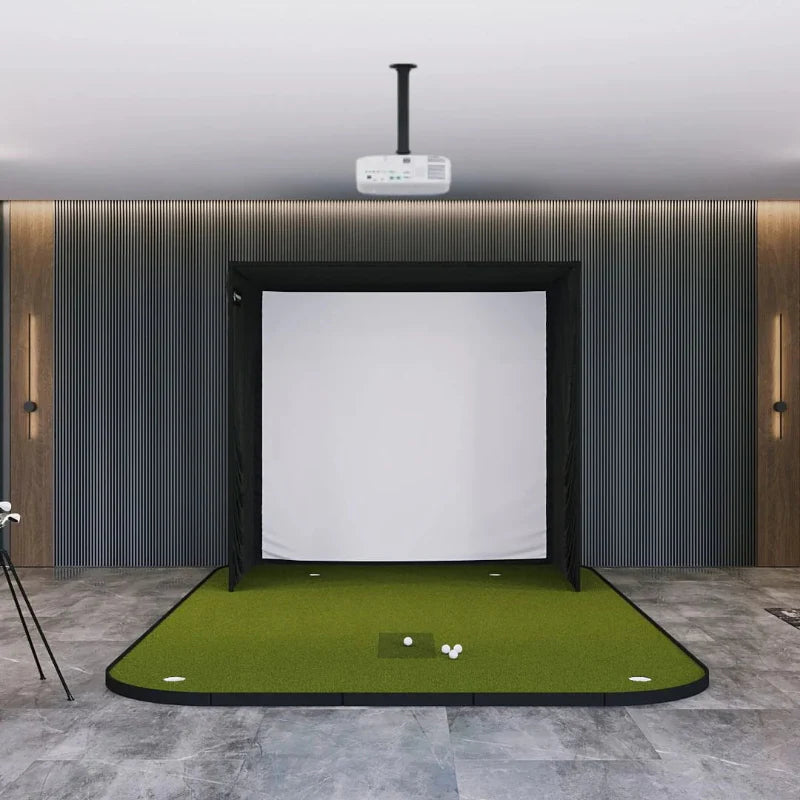
The ProTee United VX SIG Golf Simulator Package includes the ProTee United VX Launch Monitor, SIG Golf Simulator Enclosure in your preferred size and screen material, SIG Landing Pad Turf, and choice of SIGPRO Golf Mat.

Discover the perfect blend of cutting-edge technology and user-friendly simplicity with the ProTee United VX Launch Monitor. This sleek and highly accurate device is the ultimate home golf simulator studio companion, setting the standard for ceiling-mounted launch monitors.

The SIG Golf Simulator Enclosure includes all of the necessary components to complete your assembly including a SIGPRO Premium (White) or Premier (Gray) Golf Simulator Impact Screen, push pin poles and connectors, protective foam padding, premium enclosure surround material, and ball bungees.

What's Included:

  • ProTee United VX Launch Monitor
  • Free Swing Camera Set (limited time only)
  • Choice of SIG8, SIG10, or SIG12 Enclosure
  • Choice of SIGPRO Premium (White) or Premier (Gray) Impact Screen
  • SIG Landing Pad Turf
  • Choice of SIGPRO Golf Mat
  • Push Pin Poles and Connectors
  • Protective Foam Padding
  • Premium Enclosure Surround Material
  • Ball Bungees
    *SIG Landing Pad Turf is not included if SIGPRO Golf Simulator Flooring is chosen for your hitting mat selection


Optional Accessories (Not Included):

  • Projector
  • Projector Mount
  • Golf Simulator Computer or Laptop
  • Side Barrier Netting
  • Baffle
  • Blackout Screen

Instant Reaction

Experience the power of A.I. (Artificial Intelligence) and Machine Learning as the smart shot analysis software measures and projects all your data in less than a second. Get almost instant feedback after each shot for an immersive practice session.

Unrivaled 24/7 Support

ProTee VX offers around-the-clock customer support with a responsive team that continually enhances the software based on user feedback for an evolving golf experience.

Swing Cameras

Compatible with any USB driverless camera, allowing users to select the camera that best fits their swing analysis needs.

The VX Will Measure It All

The VX measures all relevant ball and club data. Each data point is specifically measured and visualized to produce and learn from results you can trust.

ProTee Labs Software

Your purchase includes a perpetual license of ProTee Labs, featuring customizable panels, high-quality video playback, and a comprehensive practice range. The clear and organized layout allows you to instantly access your data after each shot. Improve your swing right out of the box, no additional software required.

Right and Left Handed

The VX seamlessly accommodates both right and left-handed players without requiring recalibration or reconfiguration of the launch monitor.

Easy Setup

User-friendly mounting and calibration system make setting up the VX effortless, allowing you to start practicing in minutes.

Customizable Hitting Area

Tailor the hitting area to your liking, with a maximum size of 65cm x 55cm (25"L x 21"W).

Included with Your Purchase:

  • ProTee United VX Launch Monitor
  • Free Swing Camera Set (limited time only)
  • Choice of SIG8, SIG10, or SIG12 Enclosure
  • Choice of SIGPRO Premium (White) or Premier (Gray) Impact Screen
  • SIG Landing Pad Turf
  • Choice of SIGPRO Golf Mat
  • Push Pin Poles and Connectors
  • Protective Foam Padding
  • Premium Enclosure Surround Material
  • Ball Bungees
    *SIG Landing Pad Turf is not included if SIGPRO Golf Simulator Flooring is chosen for your hitting mat selection


Optional Accessories (Not Included):

  • Projector
  • Projector Mount
  • Golf Simulator Computer or Laptop
  • Side Barrier Netting
  • Baffle
  • Blackout Screen

SIG Enclosure Specifications
SIG8:

  • Overall Enclosure Dimensions: 8'4"W x 8'4"H x 5'D
  • Viewable Screen Dimensions: 7'7"W x 7'7"H x 10'8"Diag.
  • Aspect Ratio: 1:1


SIG10:

  • Overall Enclosure Dimensions: 10'10"W x 8'4"H x 5'D
  • Viewable Screen Dimensions: 10'1"W x 7'7"H x 12'7"Diag.
  • Aspect Ratio: 4:3


SIG12:

  • Overall Enclosure Dimensions: 12'2"W x 9'4"H x 5'D
  • Viewable Screen Dimensions: 11'5"W x 8'7"H x 14'3"Diag.
  • Aspect Ratio: 4:3


Please Note: We recommend you give yourself an absolute minimum of 2-3 inches of buffer space between the top of your enclosure and ceiling to be able to complete your enclosure assembly with ease. For width, we recommend giving yourself 2-3 inches of buffer space between each side of your enclosure and side walls.

Hitting Mat Specifications
Fairway Series:

  • Dimensions: 5'D x 5'W x 1-⅝"H
  • Weight: 41 lbs
  • Real Tee Compatibility: Yes


SIGPRO Softy 4' x 7':

  • Dimensions: 4'D x 7'W x 2-½"H
  • Weight: 21 lbs
  • Replaceable Hitting Strip: SIGPRO Softy (Included)
  • Hitting Strip Dimensions: 28"L x 12"W x 2-⅝"H
  • Real Tee Compatibility: Yes


SIGPRO Softy 4' x 10':

  • Dimensions: 4'D x 10'W x 2-½"H
  • Weight: 31 lbs
  • Replaceable Hitting Strip: SIGPRO Softy (Included)
  • Hitting Strip Dimensions: 28"L x 12"W x 2-⅝"H
  • Real Tee Compatibility: Yes


SIG8 Golf Simulator Flooring:

  • Dimensions: 15'6"D x 9'8"W x 2-⅜"H
  • Replaceable Hitting Strip: SIGPRO Softy (Included)
  • Hitting Strip Dimensions: 28"L x 12"W x 2-⅝"H
  • Center of Hitting Strip to Impact Screen: 10'6"
  • Real Tee Compatibility: Yes
  • Stimpmeter Reading: 9-10
  • Putting Cups: (4). Flags not included.


SIG10 Golf Simulator Flooring:

  • Dimensions: 15'6"D x 11'7"W x 2-⅜"H
  • Replaceable Hitting Strip: SIGPRO Softy (Included)
  • Hitting Strip Dimensions: 28"L x 12"W x 2-⅝"H
  • Center of Hitting Strip to Impact Screen: 10'6"
  • Real Tee Compatibility: Yes
  • Stimpmeter Reading: 9-10
  • Putting Cups: (4). Flags not included.


SIG12 Golf Simulator Flooring:

  • Dimensions: 15'6"D x 13'6"W x 2-⅜"H
  • Replaceable Hitting Strip: SIGPRO Softy (Included)
  • Hitting Strip Dimensions: 28"L x 12"W x 2-⅝"H
  • Center of Hitting Strip to Impact Screen: 10'6"
  • Real Tee Compatibility: Yes
  • Stimpmeter Reading: 9-10
  • Putting Cups: (4). Flags not included.


Landing Pad Turf Specifications
SIG8 Landing Pad Turf:

  • Dimensions: 8'D x 8'2"W x ⅜"H
  • Weight: 38 lbs
  • Construction: 2 halves rolled together
  • Material: Nylon


SIG10 Landing Pad Turf:

  • Dimensions: 8'D x 10'6"W x ⅜"H
  • Weight: 39 lbs
  • Construction: 2 halves rolled together
  • Material: Nylon


SIG12 Landing Pad Turf:

  • Dimensions: 9'D x 12'W x ⅜"H
  • Weight: 40 lbs
  • Construction: 2 halves rolled together
  • Material: Nylon

Documents:

SIG8 Enclosure Assembly Instructions

SIG8 Flooring Assembly Manual

SIG10 Enclosure Assembly Instructions

SIG10 Flooring Assembly Manual

SIG12 Enclosure Assembly Instructions

SIG12 Flooring Assembly Manual

Sig 8 Assembly Video

Sig 8 Pro Flooring Install Video

Sig 10 Assembly Video

Sig 10 Pro Flooring Install Video

Sig 12 Assembly Video

Sig 12 Flooring Assembly Video

Q: What is included with the ProTee United VX SIG Golf Simulator Package?

A: ProTee United VX Launch Monitor,choice of SIG8, SIG10, or SIG12 Enclosure, choice of SIGPRO Premium (White) or Premier (Gray) Impact Screen, SIG Landing Pad Turf, choice of SIGPRO Golf Mat, push pin poles and connectors, protective foam padding, premium enclosure surround material, ball bungees.
*SIG Landing Pad Turf is not included if SIGPRO Golf Simulator Flooring is chosen for your hitting mat selection.

Q: How far away should I stand from my impact screen?

A: For the safety of both the golfer and the screen, we recommend standing a minimum of 10-12 feet away from the screen.

Q: How much buffer space do I need around my enclosure?

A:We recommend you give yourself an absolute minimum of 2-3 inches of buffer space between the top of your enclosure and ceiling to be able to complete your enclosure assembly with ease. For width, we recommend giving yourself 2-3 inches of buffer space between each side of your enclosure and side walls.

Q: How much space do I need for the enclosure?

A: When planning your simulator space, consider several factors including buffer space around walls and ceilings, enclosure footprint, launch monitor requirements, safe golfer distance (10-12 feet from the screen), golfer height, club length, turf thickness, and any nearby furniture or doorways.

Q: What if the black enclosure surround material gets hit with a golf ball?

A: The black enclosure surround material isn’t designed to take direct hits, but if a ball bounces off the impact screen and hits the enclosure, you should not experience any issues.

Q: Is all of the necessary piping included to complete the assembly of my enclosure?

A: Yes, your purchase includespush pin poles that are sized to the exact dimensions required for your chosen enclosure size. Connectors are also included.

Q: How long does it take to assemble the enclosure?

A: Assembly time for your SIG Enclosure is about 1-2 hours, depending on size and whether you have a helper. For guidance, refer to our assembly video and manual.

Q: Where and how should I mount my projector?

A: Projector placement depends on your viewable screen dimensions, aspect ratio, and the throw ratio of your projector. Feel free to reach out to our team so we can provide you with the exact mounting location based upon the enclosure size and projector that you choose. Common mounting options include flush or drop mounts.

Speak with a Golf Simulator Expert

We understand that designing the perfect golf simulator can be a complex task. Get in touch with one of our Golf Simulator Experts for a free consultation, or to address any questions that you might have.